
Appearance
Workflow example
Schedule a meeting
This workflow turns a natural-language meeting request into a calendar event while keeping missing information and final approval with the user.
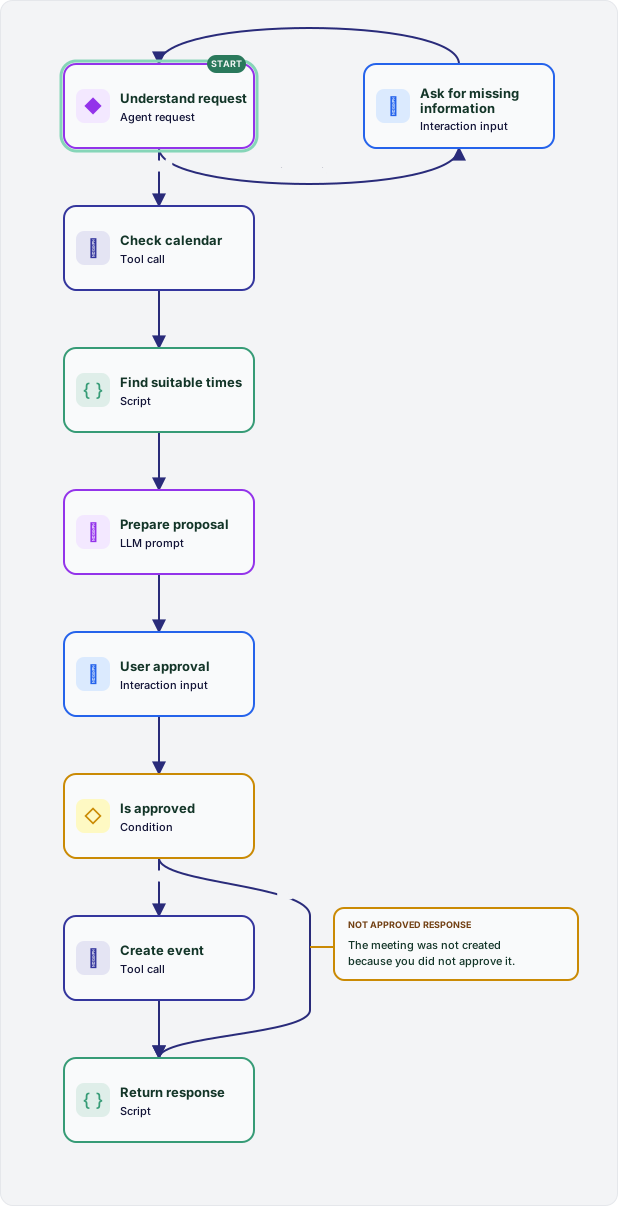
What this flow does
understand-requestextracts the meeting details. If required information is missing,ask-for-missing-informationcollects it and returns to the same model turn.check-calendarcalls the availability tool after the request is complete.find-suitable-timesdeterministically selects up to three slots that fit the requested duration and date range.prepare-proposalchooses a slot and formats the event details for review.user-approvalpauses the workflow for explicit confirmation, andis-approvedroutes the result.- Approved requests call
create-event; declined requests skip creation. Both routes finish atreturn-responsewith a user-facing result.
The graph separates model judgment, deterministic code, external side effects, and human decisions into explicit nodes. Routed connections make the interaction loop and the approval boundary visible before the workflow runs.
Process a chat turn
The diagram below is based on a production-style chat workflow. It shows a common pattern: load state, run one or more model turns, optionally call tools in a loop, rewrite/finalize output, then persist updated state.
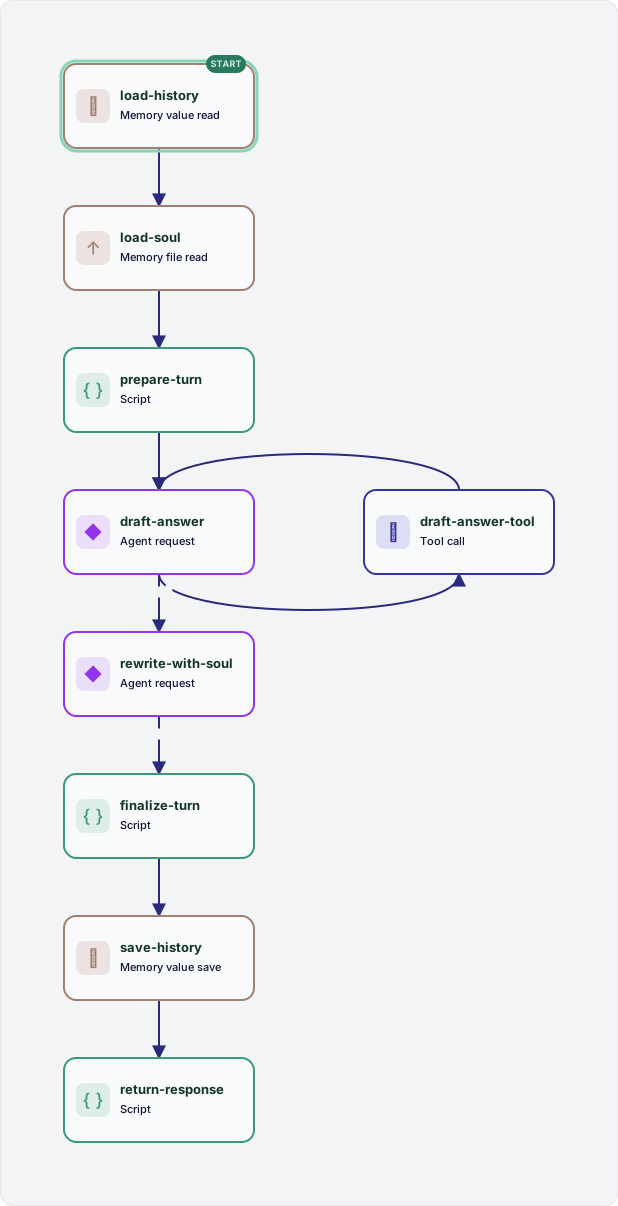
What this flow does
load-historyandload-soulload session transcript and style/personality guidance from memory.prepare-turnvalidates and normalizes user input (including attachments).draft-answerruns anagent-requestturn and may route totool.draft-answer-toolexecutes the selected tool call, then returns todraft-answer.rewrite-with-soulperforms a final rewrite pass for tone and consistency.finalize-turn,save-history, andreturn-responseproduce output and persist conversation state.
What this looks like in workflow code
The graph is ordinary workflow YAML: node definitions plus explicit routed edges.
yaml
start: load-history

nodes:
  # Earlier state-loading and input-preparation nodes are omitted.
  - id: draft-answer
    type: agent-request
    maxSteps: 10
    prompt:
      template: >-
        Produce a draft answer. Call tools when needed.

  - id: draft-answer-tool
    type: tool-call
    input:
      tool:
        expr: nodes['draft-answer'].output.tool
      arguments:
        expr: nodes['draft-answer'].output.arguments
      callId:
        expr: nodes['draft-answer'].output.callId

  # Later rewriting and persistence nodes are omitted.

connections:
  # Connections from the omitted preparation nodes are omitted.
  - from: draft-answer
    route: tool
    to: draft-answer-tool
  - from: draft-answer-tool
    to: draft-answer
  - from: draft-answer
    route: final
    to: rewrite-with-soul
  # Connections to the omitted persistence nodes are omitted.
Tool access is declared in the workflow manifest, so model turns only see the tools you explicitly allow.
yaml
permissions:
  tools:
    - id: github-search
      tool: github/search_repositories
      consent: inherit
      required: true
    - id: fs-read
      tool: filesystem/read_file
      consent: inherit
      required: true
External provider implementation (what to build)
A provider is a trusted workspace driver under a source's drivers/provider/<type> directory with a manifest and TypeScript entrypoint.
manifest.yaml:
yaml
apiVersion: 1
kind: provider
type: openai-compatible
entrypoint: ./driver.ts
driver.ts (minimal skeleton):
ts
import type {
  AgentCapableModel,
  AgentMessage,
  AgentTurnRequest,
  AgentTurnResult,
  AiModelRequest,
  AiProviderDefinition,
} from "@faimulus/driver-sdk";

interface ProviderConfig {
  apiKey: string;
  model: string;
  baseUrl?: string;
}

interface ChatMessage {
  role: "system" | "user" | "assistant" | "tool";
  content: string | null;
  tool_call_id?: string;
  tool_calls?: Array<{
    id: string;
    type: "function";
    function: { name: string; arguments: string };
  }>;
}

interface ChatResponse {
  choices?: Array<{ message?: ChatMessage }>;
}

class OpenAiCompatibleModel implements AgentCapableModel {
  constructor(private readonly config: ProviderConfig) {}

  private async complete(
    messages: ChatMessage[],
    tools?: AgentTurnRequest["tools"],
    signal?: AbortSignal,
  ): Promise<ChatMessage> {
    const response = await fetch(
      `${this.config.baseUrl ?? "https://api.openai.com/v1"}/chat/completions`,
      {
        method: "POST",
        signal,
        headers: {
          "Content-Type": "application/json",
          Authorization: `Bearer ${this.config.apiKey}`,
        },
        body: JSON.stringify({
          model: this.config.model,
          messages,
          ...(tools?.length
            ? {
                tools: tools.map((tool) => ({
                  type: "function",
                  function: {
                    name: tool.name,
                    description: tool.description,
                    parameters: tool.inputSchema ?? { type: "object" },
                  },
                })),
              }
            : {}),
        }),
      },
    );

    if (!response.ok)
      throw new Error(`Provider call failed with status ${response.status}`);

    const body = (await response.json()) as ChatResponse;
    return body.choices?.[0]?.message ?? { role: "assistant", content: "" };
  }

  async execute(request: AiModelRequest): Promise<unknown> {
    const message = await this.complete([
      ...(request.prompt
        ? [{ role: "system" as const, content: request.prompt.template }]
        : []),
      { role: "user", content: JSON.stringify(request.input) },
    ]);
    return message.content ?? "";
  }

  async executeAgentTurn(request: AgentTurnRequest): Promise<AgentTurnResult> {
    const messages = request.messages.map(toChatMessage);
    const message = await this.complete(
      messages,
      request.tools,
      request.signal,
    );
    if (message.tool_calls?.length)
      return {
        type: "tool-calls",
        calls: message.tool_calls.map((call) => ({
          id: call.id,
          name: call.function.name,
          arguments: JSON.parse(call.function.arguments) as Record<
            string,
            unknown
          >,
        })),
      };
    return { type: "final", output: message.content ?? "" };
  }
}

function toChatMessage(message: AgentMessage): ChatMessage {
  if (message.role === "tool")
    return {
      role: "tool",
      content: message.content,
      tool_call_id: message.toolCallId,
    };
  if ("content" in message)
    return { role: message.role, content: message.content };
  return {
    role: "assistant",
    content: null,
    tool_calls: [
      {
        id: message.toolCall.id,
        type: "function",
        function: {
          name: message.toolCall.name,
          arguments: JSON.stringify(message.toolCall.arguments),
        },
      },
    ],
  };
}

const definition: AiProviderDefinition<ProviderConfig> = {
  type: "openai-compatible",
  displayName: "OpenAI compatible",
  configSchema: {
    type: "object",
    additionalProperties: false,
    required: ["apiKey", "model"],
    properties: {
      apiKey: { type: "string", writeOnly: true },
      model: { type: "string", minLength: 1 },
      baseUrl: { type: "string", format: "uri" },
    },
  },
  async createModel(config) {
    return new OpenAiCompatibleModel(config);
  },
};

export default definition;
Then wire it through workspace config:
yaml
# config/providers.yaml
version: 1
providers:
  main-openai:
    type: openai-compatible
    config:
      apiKey: ${OPENAI_API_KEY}
      baseUrl: https://api.openai.com/v1
yaml
# config/models.yaml
version: 1
models:
  general:
    provider: main-openai
    config:
      model: gpt-4.1-mini
Use different model roles per step
One workflow can use a cheaper fast model for routing/tool selection and a stronger model for final answer quality.
yaml
# config/models.yaml
version: 1
models:
  general:
    provider: main-openai
    config:
      model: gpt-4.1-mini
  router:
    provider: main-openai
    config:
      model: gpt-4.1-mini
  rewriter:
    provider: main-openai
    config:
      model: gpt-4.1
yaml
# workflow flow.yaml
- id: draft-answer
  type: agent-request
  model:
    role: general
  maxSteps: 10

- id: rewrite-with-soul
  type: agent-request
  model:
    role: rewriter
  maxSteps: 1
This keeps role names stable in workflow code while deployment can swap concrete models per environment.
Add real MCP servers
config/toolsets.yaml supports MCP Streamable HTTP records. In production, point these at real MCP services such as GitHub, Filesystem, and Postgres servers (typically behind an internal MCP gateway).
yaml
version: 1
toolsets:
  github:
    label: GitHub MCP
    enabled: true
    provider:
      type: mcp-streamable-http
      endpointUrl: http://mcp-gateway:8080/mcp/github
      authToken: ${GITHUB_MCP_TOKEN}
    policies:
      search_repositories: allow
      create_issue: ask

  filesystem:
    label: Filesystem MCP
    enabled: true
    provider:
      type: mcp-streamable-http
      endpointUrl: http://mcp-gateway:8080/mcp/filesystem
    policies:
      read_file: allow
      write_file: ask

  postgres:
    label: Postgres MCP
    enabled: true
    provider:
      type: mcp-streamable-http
      endpointUrl: http://mcp-gateway:8080/mcp/postgres
      authToken: ${POSTGRES_MCP_TOKEN}
    policies:
      query: allow
      execute: ask
Recommended operational pattern:
- Keep toolset credentials in environment variables referenced by
authToken: ${ENV_VAR}. - Start with conservative policies (
askfor mutating operations). - Declare only the specific tools each workflow needs in
manifest.yamlpermissions. - Treat MCP servers as privileged infrastructure with network egress controls and audit logging.